


PixlPal
AI/ML Engineering
Lovable for photo editing. Imagine if an AI agent could use Photoshop.
Pitch
I am building Lovable for Photo Editing. Think of it like having an AI agent use photoshop in front of you.
https://pixlpal.com
The Problem with diffusion models
AI image editing is getting popular because it allows people without any experience in using image editing software to create beautiful edits of their photos.
However, the problem with AI image editing approaches right now is that they regenerate the photo. This approach is prone to mistakes such as the image generation model adding or removing certain details, or introducing diffusion noise. And since it “edits” by regenerating the whole photo, it leaves little control for the user to tweak certain image editing parameters themselves. It is not a true edit.
PixlPal’s Approach
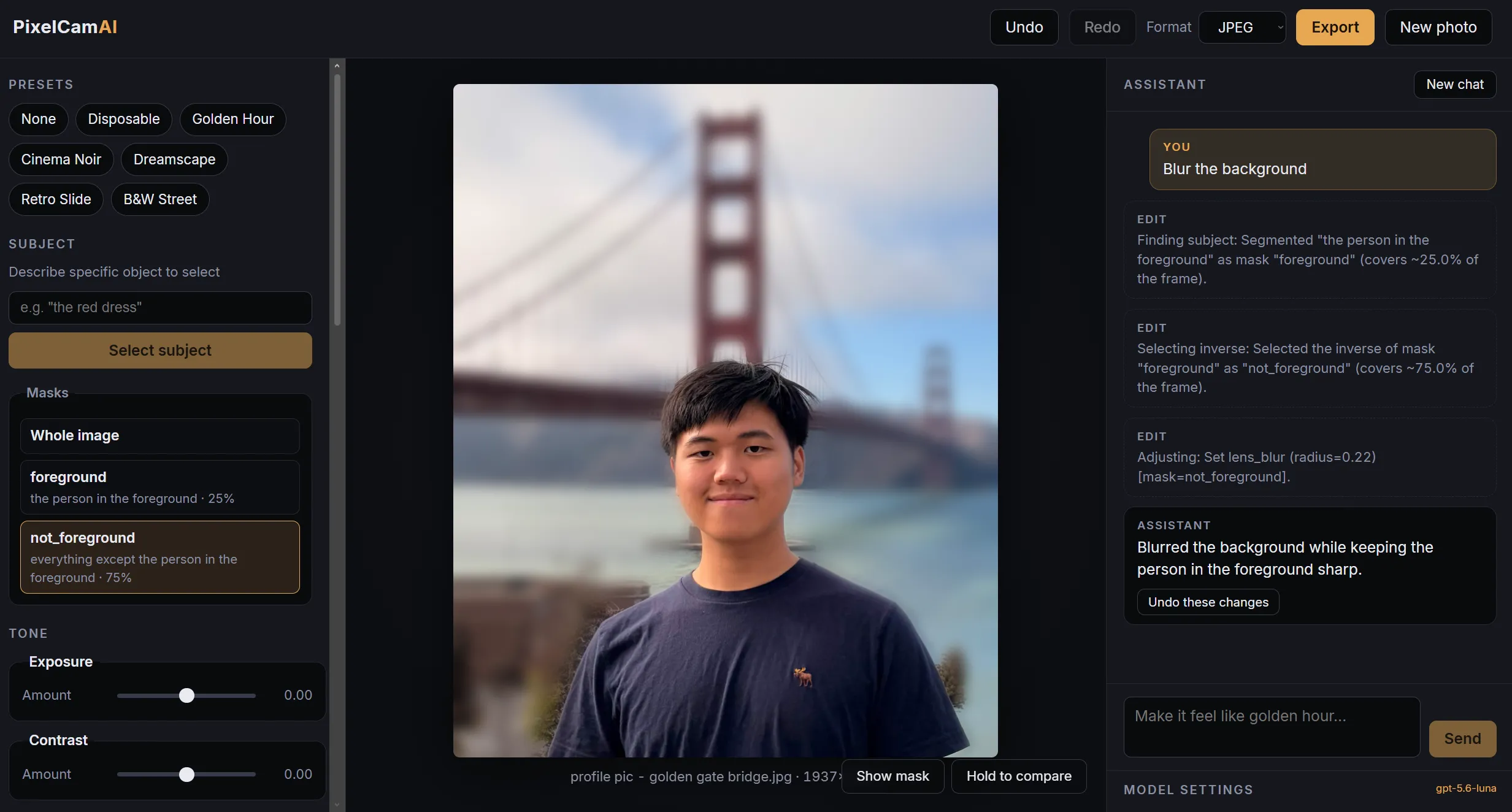
PixlPal believes that AI should instead use deterministic tools (like in photoshop) to truly edit the images directly. So I created a custom Rust engine that exposes tools/APIs for an AI agent orchestrator to edit photos. The coolest part: I added a segmentation model that agents can call so it can select specific objects to apply specific transformations to as well.
Think of it like watching an AI agent use Photoshop or Lightroom while you watch and tweak, instead of having it one-shot regenerate the whole image.
PixlPal’s approach also creates a better user experience because the user has more control over the editing process. With image gen models, this was impossible: they need to regenerate the image as a whole. It is not a “true” edit. But with PixlPal, users can tweak edits directly if they want.
Challenges
Usually people want to apply changes only to specific objects instead of the whole image (think of the lasso tool). Without that capability, PixlPal was just a filter-applier rather than a true agentic image editor. At first, I thought this would mean needing to get an AI agent to use a lasso tool (very hard). Eventually, I realized I can just add an Image Segmentation Model as a tool-call for the agent. So the agent does a natural-language prompt to the segmentation model i.e. “select the red snack bag”, and the segmentation model returns the exact pixels of the red snack bag, and then the agent can apply pixel transformations specifically to those pixels.
Dev log
7/23/2026 (idea)
Messages of me wondering out loud about this idea:
has someone made an AI photo editor that doesn’t change the photo by generating a new one but by applying very custom filters? “Make my photo look dreamy, nostalgic, film grain, 2010 digital camera”
ok I should apply x filter and adjust y colors and do z “Here you go. Any adjustments?” Actually This should be the approach for any AI image editing “Hey remove my mole from my photo”Output: AI slop “Hey remove my mole from my photo” Output: like if a semi-pro did it in photoshop I guess once AI gen gets good enough it can just one shot generate the image without looking like slop But that’s not coming for what, maybe another 2 years? It’d be a web app First prompt is free After that you get paywalled Eh I’ll think about the revenue model later Gotta see if it’d even work first
7/28/2026 (starting to build)
Built the rust image engine. Otw to implement AI agent orchestrator.
I dont think Adobe Photoshop/Lightroom has implemented something like this yet? Which is making this a more and more viable idea And I think the target audience (non-photoshop people) would prefer going to a lightweight app/website that just does the thing decently rather than having to download a whole desktop app Like the pitch here is “Lovable for photo editing”, not “Cursor for photo editing” Cursor was just VSCode with AI features. Designed for coders. Whereas Lovable is not a code editor at all. Designed for non-coders. This thing is like Lovable. AI photo editor for people who don’t know the first thing about photo editing/color grading/etc (like me). Whatever Adobe makes (if they make it at all) is gonna be Cursor for photo editors. Friend tells me that in higher levels you have to selectively apply your transformations to certain areas instead of global image-wide filters (like “dodge and burn”) to accentuate certain things I mean I can at least do like image-wide color grading But to have an AI agent be able to use a lasso tool I dont even know where to start Does further research into how to solve this problem and finds out about segmentation models like SAM Ok this is quite doable Why not, sounds fun. I’ll build this out very slowly on the side As far as I can tell also still novel? Been looking around and can’t find something like this available yet
I imagine there’s a market for paying customers as well:
- small-medium businesses who want good-looking photos but cheap out on professional editing (restaurant owners, small landlords, airbnb hosts)
- Instagram e-girls
- very amateur photographers, who then sell to above as well
On the consumer side:
- Instagram addict girls, though I think only a really small % of them would ever want to pay
8/7/2026
Built the AI agent that calls the Rust engine.
For amateur photo editors, a feature where you can just upload a photo and tell the AI to
“Make it look like this” might be better actually.
8/9/2026
Implementing image segmentation.
Wanted to confirm that image editing via generation is indeed slop and that PixelCamAI can offer a better real edited output. Tried ChatGPT to edit a picture to emphasize a person and de-emmphasize the mountain background. While it looked good from afar, when you zoom in it indeed looks like absolute slop. It’s like the mountain became some eldritch soup. Uncanny and off-putting. Would NEVER post that online.
I’m also finding that you really still need to know some principles of photo editing in order to prompt the AI well. I think once I get this image segmentation thing down, I’m just gonna make a “Make my photo look better” button and let the AI agent decide how to go about that. I suspect I’d need some soft-rules for that though like:
- If it’s a photo of a person, emphasize the person
- If it’s a photo during the sunset, make the colors warmer and pop out more
- If it’s a night photo, darken the lights etc.
And then have it try n different approaches and let the user pick which one they like best.
This all requires some domain knowledge on my part into what makes a good edit and not though. The Instagram Algorithm has recently started recommending me a bunch of photo editing-related reels, so maybe I’ll passively learn as I go along.
Problems encountered with image seg:
- Square bounding boxes. Not enough precision. Have to find a small model that can still do precise segmentation through natural language prompts.
- App can only apply one filter. Must implement ability to apply different filters to different parts of the image (layers).
- Edge case: 2 objects overlap. i.e. huge mountain in front of a person. When the app selects mountain, it selects the person too
8/11/2026
Talked with friend who has domain knowledge in image editing. Going to distill his thought process and workflow when editing an image into a markdown skill file. And use some of his before/after editing work as a baseline goal AKA get PixelCamAI to be able to edit the same photo as good as him.
Also, important insight: for most people, good enough is good enough. One could argue that image editing is a fundamentally creative process and AI still sucks at creativity, but most people don’t care about it to that level, they just care about good enough. And to get to good enough is mostly like rule-of-thumb stuff.